This is the documentation for yoctofetch v2.0.0.
yoctofetch
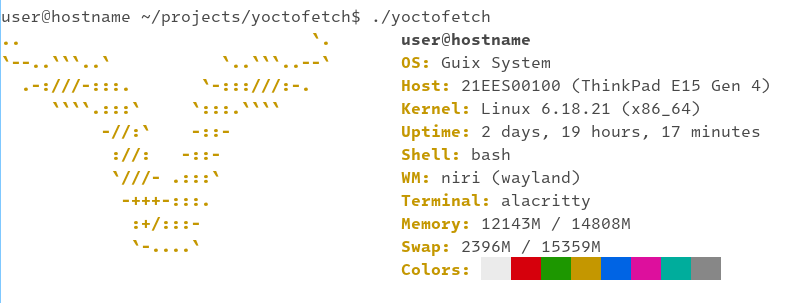




Fast and low footprint system fetch tool for the Linux™ UAPI
In contrast to all the fetch tools out there which claim to be “really fast”,
yoctofetch is an actually fast and tiny system fetch tool.
It currently has a stripped weight of about 20kb and runs in ~200μs
(yes, microseconds).
Despite its incredible performance, it still supports quite a few features:
-
Logos (currently only Guix and Arch—more to come)
-
The majority of common system information
-
Customization via a configuration file
-
Disable output of specific system information
-
-
NO_COLOR support
Background
I came across a multitude of sys-fetch (neofetch like) tools on the web, each one claiming to be bazingly fast. This kind of prompted me to make one which actually deserves the title blazingly fast without compromising too much on features.
Also, I like minimalistic software which has a low resource foot print and is not suspectible to all these supply chain attacks that we got on the regular nowadays.
This is why this entire thing is written as a freestanding C program, meaning the only dependency is a Linux™ kernel to run on.
Motivation
I came across a multitude of sys-fetch (neofetch like) tools on the web, each one claiming to be bazingly fast. This kind of prompted me to make one which actually deserves the title blazingly fast without compromising too much on features.
Also, I like minimalistic software which has a low resource foot print and is not suspectible to all these supply chain attacks that we got on the regular nowadays.
This is why this entire thing is written as a freestanding C program, meaning the only dependency is a Linux™ kernel to run on.
Freestanding environment (no libc)
This software does not depend on a libc, which means it can be linked into a tiny, static binary.
Further advantages are that it would not be affected by a bug or security hole in glibc or any other libc implementation.
However, this also limits its platform support.
Currently the following are supported:
-
Linux ABI
-
x86_64
-
aarch64
-
Source code origin
All source code has been written by humans, without the assistance of LLMs (commonly refered to as “AI“).
History
This project originally started out under the name Ångströmfetch, but has been renamed since version 1.2.0.
Install
As a distro package

The Arch Linux AUR offers a stable and a git variant:
For Guix System:
guix install yoctofetchFor debian based distributions, there is a deb package available on the
Codeberg releases page.
From source
# git clone and cd to checkout
./configure
make
sudo make install
Install from repository as Guix channel
Use this repository as Guix channel with the following channel configuration/introduction:
      (channel
        (name 'yoctofetch)
        (url "https://codeberg.org/Phosphenius/yoctofetch.git")
        (branch "main")
        (introduction
          (make-channel-introduction
            "259077c4909205af495edd5b5dded5b1173f0217"
            (openpgp-fingerprint
              "E504 167C B345 F93E 11AE  341C 1CDA 78BC 7F6C F294"))))
The package is called yoctofetch-git:
guix install yoctofetch-gitUsage
Simply run from your shell:
yoctofetchOr put it in your .bashrc:
cd
echo "yoctofetch" >> .bashrc
Customization
The configuration file (usually ~/.config/yoctofetch/yoctofetch.conf) can be
used to en- or disable all available output options, given that configuration
file support is enabled, which is the default, but can be changed via
./configure --disable-config-file when building for some extra performance.
Per default, all options are enabled—even if there is no configuration file (support).
Performance
The actual performance depends on multiple factors, such as how yoctofetch was built and the layout of the files on the system.
Build configuration
The recommended configuration for maximum performance is something like:
./configure CC=gcc CFLAGS="-march=x86-64-v3 -O2 -flto" LDFLAGS="-Wl,--strip-all" --disable-config-fileAt this point, it is uncertain if there is any benefit to -flto. One has to
experiment with the flags a bit. On my system, this yields a binary 19K in size
which runs in < 230µs.
Also, -march=x86_64-v3 will not work on older CPUs and might have to be
replaced with -march=native or similar.
File layout
yoctofetch expects the data in files to be in a certain order or layout
and can read them faster if these expectations are met.
For the configuration file, this is usually under the control of the user and it is therefor recommended to keep the values in the configuration file in their default order.
This does not work for system files like /etc/os-release though.
So performance will vary, even on the same hardware if a different Linux™ distro
is installed.
Benchmarks
Run with hyperfine on a laptop with AMD Ryzen 7 5825U CPU.
| Fetch | Mean (µs) | Min (μs) | Max (μs) | Relative |
|---|---|---|---|---|
yoctofetch |
217.6 ± 37.7 |
164.5 |
678.2 |
1 |
microfetch |
884.4 ± 85.8 |
645.3 |
1431.9 |
4.06 ± 0.81 |
macchina |
3100 ± 300 |
2600 |
4800 |
14.19 ± 2.77 |
uwufetch |
16800 ± 600 |
16100 |
20200 |
77.42 ± 13.75 |
fastfetch |
33400 ± 1500 |
30200 |
37400 |
153.71 ± 27.48 |
pfetch |
89100 ± 2800 |
84500 |
96400 |
409.27 ± 72.11 |
ufetch |
101200 ± 3700 |
98200 |
114500 |
464.91 ± 82.37 |
screenfetch |
243900 ± 3100 |
24000 |
25000 |
1120.85 ± 194.94 |
neofetch |
288200 ± 13800 |
270200 |
309100 |
1324.64 ± 238.35 |
Maintainers
-
Luca Kredel (luca dot kredel at web dot de)
Contributing
Open to pull requests, as long as they are written by humans and not LLMs.
See the contribution guidelines for details.
If you’ve found a bug or have a feature request, please open an issue on Codeberg.
License
All source code is provided under the terms of the GPL-3.0-or-later license.
© Luca Kredel
Contribution guidelines
Open an issue before you open a pull request!
Scope
This project is kind of feature complete-ish, meaning there is still room for some, but an eye has to be kept on performance and binary size.
With these latter points being the main focus of this project, improvements in these areas are always welcome.
In other words: New features can be added if they don’t impact performance enough, performance (or size) improvements on the other hand are better.
Code style
Use clang-format to automatically format the code. This can be done via the Makefile:
make clang-formatDatatypes
Use:
* int64_t for most integer types
* uint64_t where applicable (e.g. binary flags)
* struct string for strings if applicable
Changelog
Document your changes in the Changelog.
No LLM/AI policy
No “AI”—this means LLMs like ChatGPT, Claude etc.—must be used for coding, opening pull requests and issues.
If you do not speak English, you are free to open issues in your native language.
This policy is strict—failing to adhere to it will result in rejection of changes/issues and potentially blocking of user accounts.
Code authentication
The git checkout can be authenticated using the Guix package manager:
guix git authenticate 259077c4909205af495edd5b5dded5b1173f0217 "E504 167C B345 F93E 11AE 341C 1CDA 78BC 7F6C F294"See also this blogpost and the Guix manual.
man pages
Changelog
[Unreleased]
Added
-
Config option to overwrite logo.
-
Config option to overwrite color.
-
Config option to overwrite logo colors.
-
Debian logo.
-
Fedora logo.
-
OS detection for Debian and Fedora.
Fixed
-
Output getting truncated.
Changed
-
Output of arch info from kernel to OS.
2.0.0 - 2026-04-19
Added
-
Config file support.
-
Terminal color support.
Fixed
-
Uptime output missing a newline sometimes.
-
Uptime edge cases—like exactly one hour, or less than one minute.
Changed
-
Environment variable and system file look ups for better performance.
-
Various performance improvements.
Removed
-
All command line arguments.
Copyright © 2026, Luca Kredel. CC-BY-SA-4.0